Every AI Module, Button, and Widget On a Webpage Is a Risk
In the new AI era, web pages and web-based work platforms you use everyday feature tons of uninvited AI copilots, like AI Overview on Google Search and Grok AI assistant on X. This means that almost every page you visit now provides abundant opportunities to have inappropriate conversations or accidentally input sensitive information.
Furthermore, you have abundant interaction options at your fingertips on modern webpages. Modern pages are filled with built-in widgets and interactive modules that can compromise your business’s public standing, such as the “Like” and “Share” buttons on platforms like Facebook and X. Web-accessed work platforms have abundant action buttons that can expose data or cause business disruption, like the “Download”, “Delete”, and “Export” options on Salesforce, Drive, and Office 365.
Imagine the public scrutiny that can be caused if an analyst at your company accidentally hits “Like” on a controversial post through a corporate account. Or the massive business disruption that can come from your employee hitting a bulk delete button on a critical business platform like Salesforce. Or the sensitive data that can be leaked every time an “export” button is misused.
Traditional Security Isn’t Enough For Today’s Webpages and Platforms
Controlling these risky AI copilots, buttons, and widgets without disrupting productivity is a huge challenge. They are embedded throughout the page, making granular control on them difficult. Blocking entire webpages and work platforms is not an option, because that will hurt your employee’s productivity.
Traditional security tools are not designed for this level of granular control because they inspect traffic at the network level. They can identify that a user is accessing a site, but lack the context to distinguish between all individual interactions on that site, such as when a post is viewed and clicking the Like button.
Control Web Use Element-by-Element With Prisma Browser’s Web User Interaction Control
Prisma Browser brings granular control directly into the interface with Web User Interaction Control (WUIC). You can now surgically remove elements and widgets within web and SaaS applications without blocking access to the entire page.
Legacy CASBs and SWGs did not allow you to surgically remove specific elements or widgets on webpages because they only inspected URLs and network packets, completely missing individual buttons on the page. WUIC can see every single button on the page and lets you harden the web interface while preserving the necessary page functionality to keep your employees productive
Support Productivity and High-Impact Use Cases With Granular Control
Web User Interaction Control lets you support a number of high-impact use cases, stopping risky actions that can lead to misuse or data exfiltration without disrupting legitimate use.
Removing Risky AI Widgets
In the past, fully securing a webpage meant blocking it entirely. This stops your employees from using the tools they need to be productive.
Now with WUIC, you can now surgically remove AI summarizers and chat assistants embedded on sites like Google or X. This prevents inappropriate conversations while keeping the rest of the page intact.
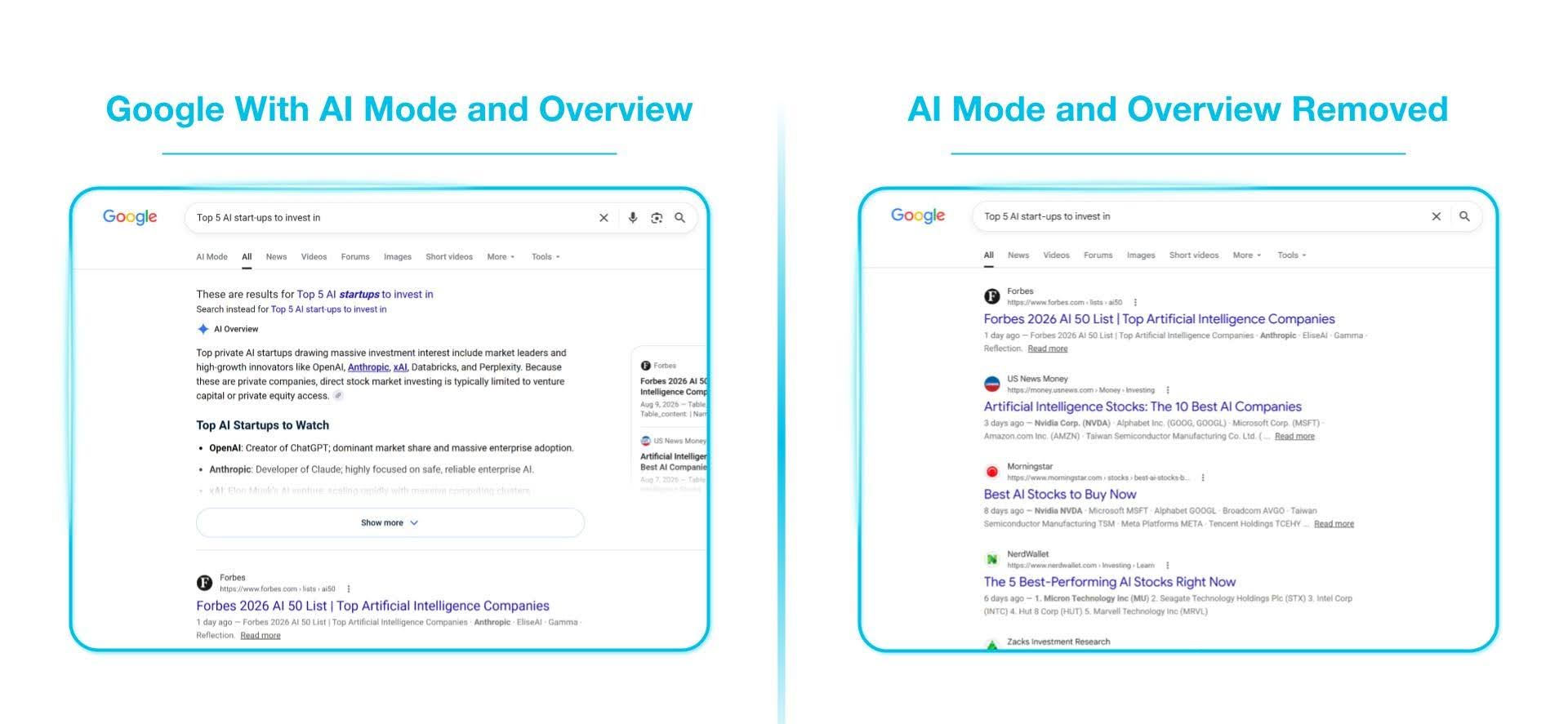
Figure 1. Removal of AI Mode and Overview from Google Search, limiting AI interaction options for the user and preventing inappropriate conversations.
Ensure Social Media Compliance
Every social media page is filled to the brim with interaction buttons, such as “Like”, “Comment”, and “Share” buttons. Every time your employee is on a social media page, they have plenty of chances to compromise the public standing of your organization.
WUIC lets you disable any interaction button you want on the page, preventing accidental public engagement.
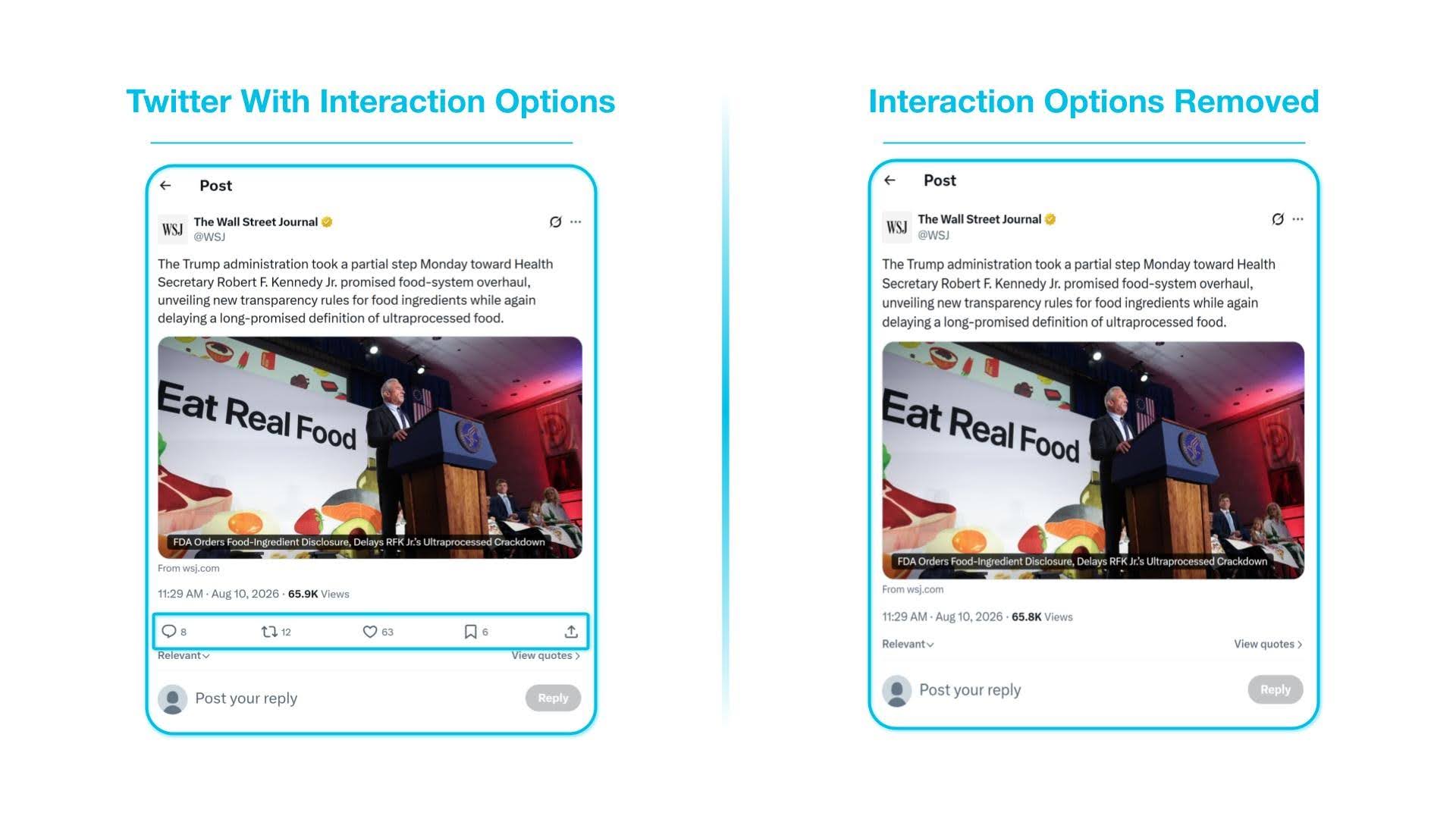
Figure 2. Removal of interaction options on X to prevent accidental engagement with political, financial, or sensitive posts.
Extend Roles-Based Access Controls Visually
Control who has access to what functionality on any web page or work platform, even ones that don’t natively support roles-based access controls.
WUIC allows you to define which employees are allowed access to web elements and which are blocked. Extend identity-based permissions directly into the UI for any web page or platform.
Protect Sensitive Data On Any Corporate or Public Application
Add an additional layer of data protection to any application on both managed and unmanaged devices being used in your organization. This includes applications that don’t natively support roles-based access controls. Remove user actions for specific groups of employees, such as “Download”, “Share”, and “Export”, from applications like Google Drive and Office 365.
Simple, Centrally-Managed Control
Implementing these granular controls is intuitive and efficient. You can simply navigate the webpage and use the Element Selector to identify and remove specific widgets or buttons with a single click. These policies are managed centrally, so you can be consistent in enforcement across the organization while providing clear oversight and governance of all restricted elements.
Secure Web Use Effectively While Delivering a Seamless Browser Experience
Safeguard users, protect your organization’s public image, secure corporate data, and enforce corporate policies during web use with granular controls. Enable full productivity for your employees on any webpage while ensuring your organization is protected.
Pick any web page or platform, choose any button, and watch it disappear. Request a demo today.