Unify operational incidents, reduce noise and connect issues to the teams and workflows that can resolve them.
Modern network and security environments generate an enormous amount of operational data. From connectivity disruptions and resource utilization to configuration issues and security service health, there is no shortage of signals telling us what is happening across our infrastructure.
Yet, for many IT and network operations teams, the challenge isn't a lack of visibility. It's knowing which signals actually matter, how to respond to them, and how to ensure the right people have the information they need.
A VPN tunnel briefly drops and recovers. An alert reaches an engineer, who starts investigating only to find connectivity restored. Now multiply that across hundreds of tunnels, firewalls, and locations, these interruptions consume time that teams need for more pressing issues.
Not every alert requires attention, and not every issue should be handled the same way.
This is where a more thoughtful approach to incident management can make a difference.
With the Unified Incident Framework in Strata Cloud Manager (SCM), customers can go beyond simply monitoring incidents. They can customize how incidents are detected, control what deserves attention, and integrate incident information directly into their existing operational workflows.
Here are five ways to put those capabilities to work.
1. Start with a unified view of operational health
For organizations managing multiple network and security products, troubleshooting often begins with a basic question: Where is the problem?
A connectivity issue might originate from a Prisma Access tunnel, an NGFW device, or an underlying network service. When operational information is scattered across different tools and product-specific views, understanding the bigger picture becomes unnecessarily difficult.
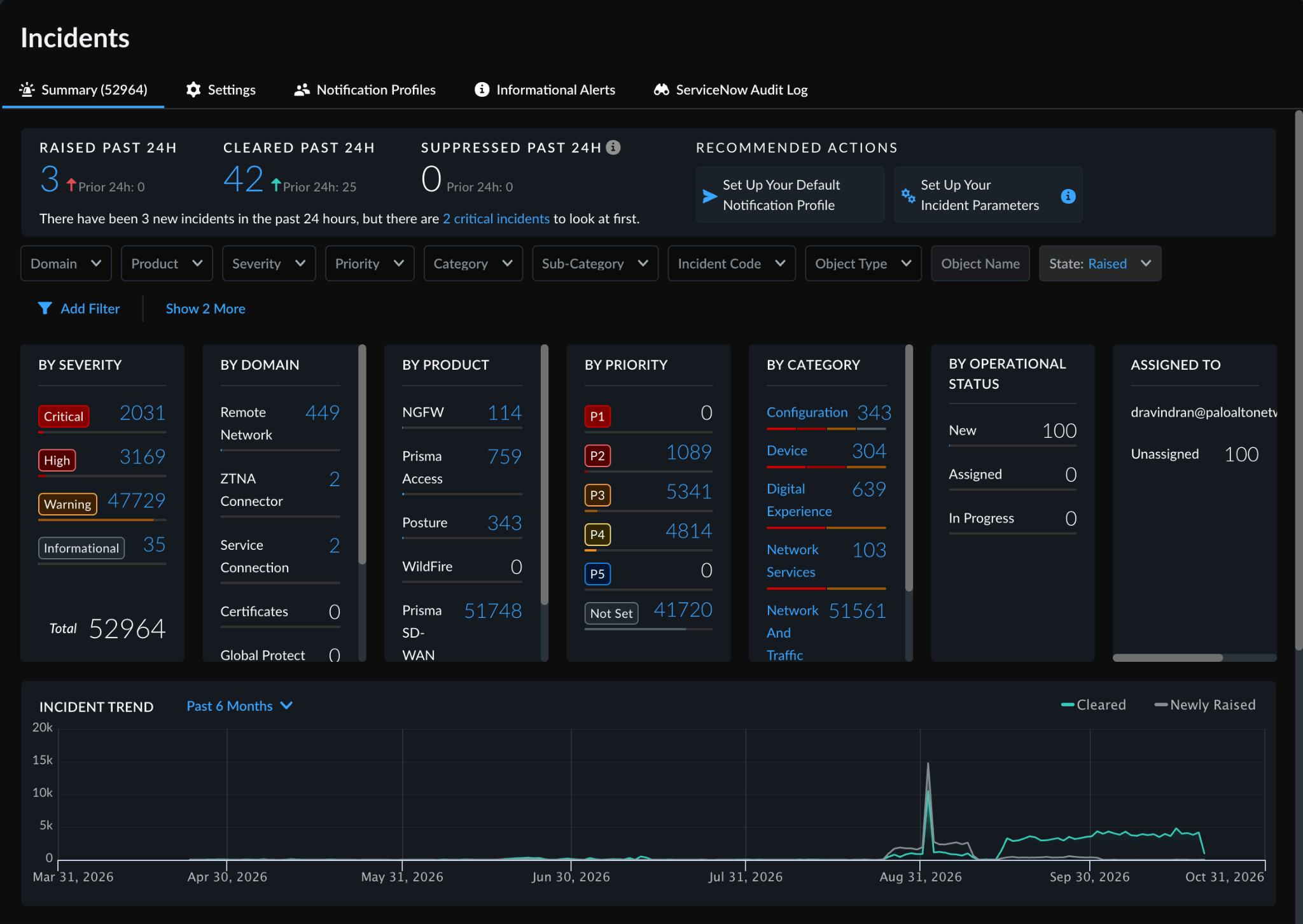
SCM Incidents provides a consolidated view of operational incidents across supported Palo Alto Networks products, including Prisma Access and Next-Generation Firewalls.
From the Incidents Summary page, teams can explore active incidents, filter by product or severity, and identify the resources impacted.
For example, if users report connectivity issues across several branch locations, a network administrator can use the incidents view to look for relevant tunnel, routing, or device health incidents instead of investigating each product independently.
The real value is having a common starting point for understanding operational health, particularly as environments grow more complex.
2. Reduce alert fatigue by tuning incidents to your environment
One of the most common challenges in network operations is alert fatigue.
Consider two organizations monitoring the same type of VPN tunnel. One supports business-critical traffic and needs immediate attention when connectivity is lost. The other has redundant connectivity and can tolerate brief interruptions.
Should both organizations receive the same notifications for every transient disruption?
Probably not.
SCM's Incident Settings allow teams to customize how incidents are handled based on their operational requirements.
Depending on the incident type and licensing, you can:
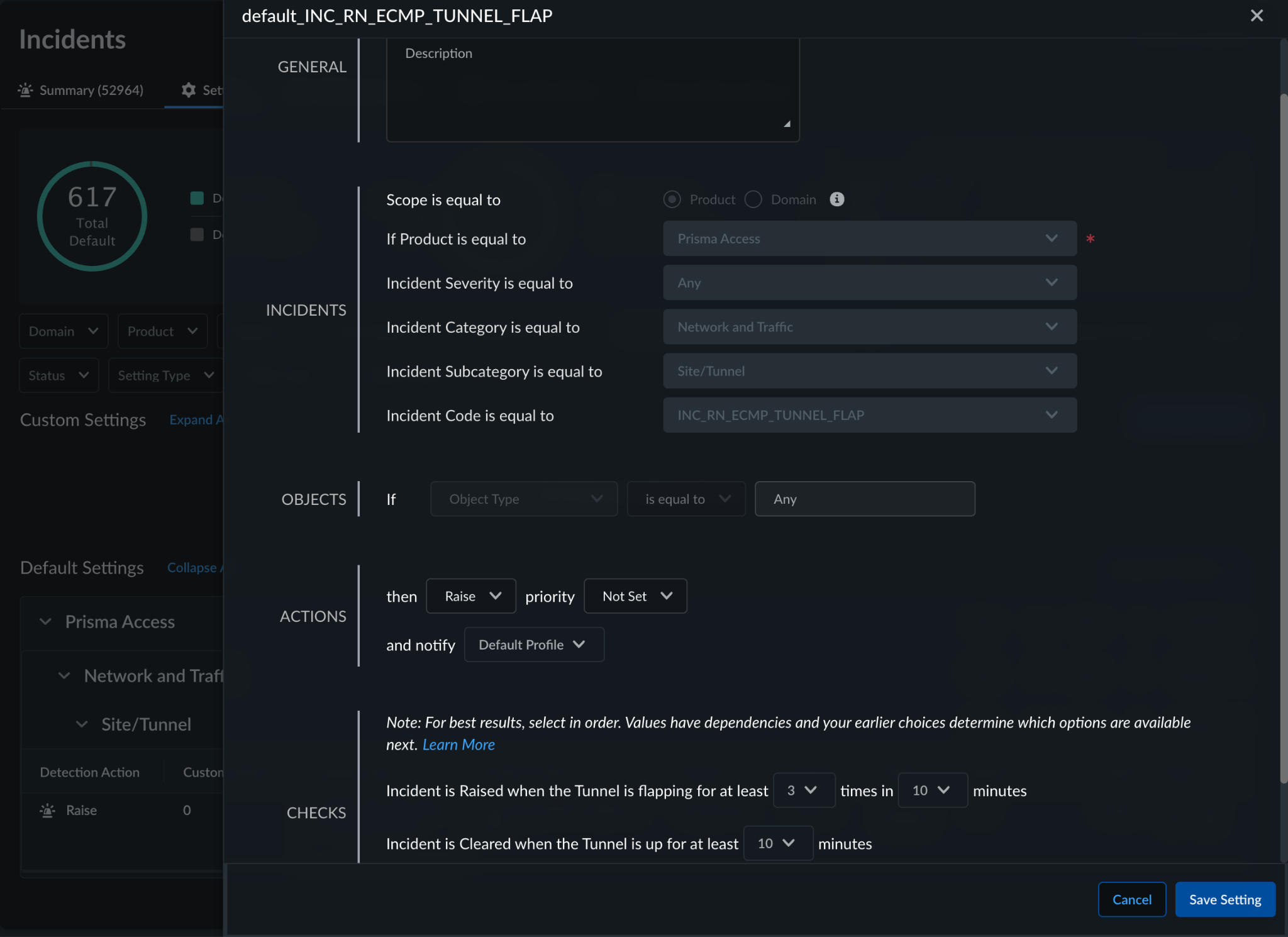
- Customize raise and clear conditions, such as requiring a tunnel to remain down for a specified duration before raising an incident.
- Create rules for specific devices, locations, or tunnels.
- Prioritize incidents based on their operational importance.
- Suppress incidents during planned maintenance windows.
- Apply different handling based on incident severity.
Let's revisit the tunnel example.
Rather than generating an incident every time a tunnel briefly fluctuates, an administrator can configure supported incident types to raise an incident only when the condition persists for a meaningful duration. Similarly, the incident can be cleared after connectivity has remained stable for a configured period.
This helps teams distinguish transient fluctuations from issues that genuinely require investigation.
The objective isn't to eliminate alerts. It's to make the incidents that remain more meaningful and trustworthy.
Learn more: Incident Settings and Customization
3. Route notifications to the right people
Detecting an issue is only half the problem. The next question is whether the right team knows about it.
In a typical enterprise, different teams own different parts of the infrastructure. Network operations may be responsible for connectivity and device health, while security teams may focus on security services and posture.
Sending every notification to a common mailbox rarely scales well.
With Notification Profiles in SCM, customers can define how and where incident notifications are delivered.
For example, an organization might want:
- Critical connectivity incidents sent to its network operations team.
- Specific device health incidents routed to the infrastructure owners.
- Lower-priority informational incidents available in SCM without generating unnecessary email notifications.
- Selected incidents delivered to a central operations platform through webhooks.
By combining incident settings with notification profiles, teams can decide which conditions trigger notifications and where those notifications should go.
SCM also provides options to test email and webhook delivery, helping administrators validate their configurations before relying on them in production.
A useful way to approach this is to start with the incidents that matter most to your business and build notification rules around clear operational ownership.
The goal is simple: less noise for everyone, and better visibility for the people who need to act.
Learn more: Create Notification Profiles
4. Connect incidents to existing response workflows
The team resolving an issue may work primarily in ServiceNow, an on-call platform or an internal operations tool. Bringing incident information into those systems helps teams use their established triage, escalation and resolution processes.
SCM supports ServiceNow integration, webhooks and incident APIs. With ServiceNow integration configured, SCM incidents can create tickets and send lifecycle updates, reducing manual ticket creation.
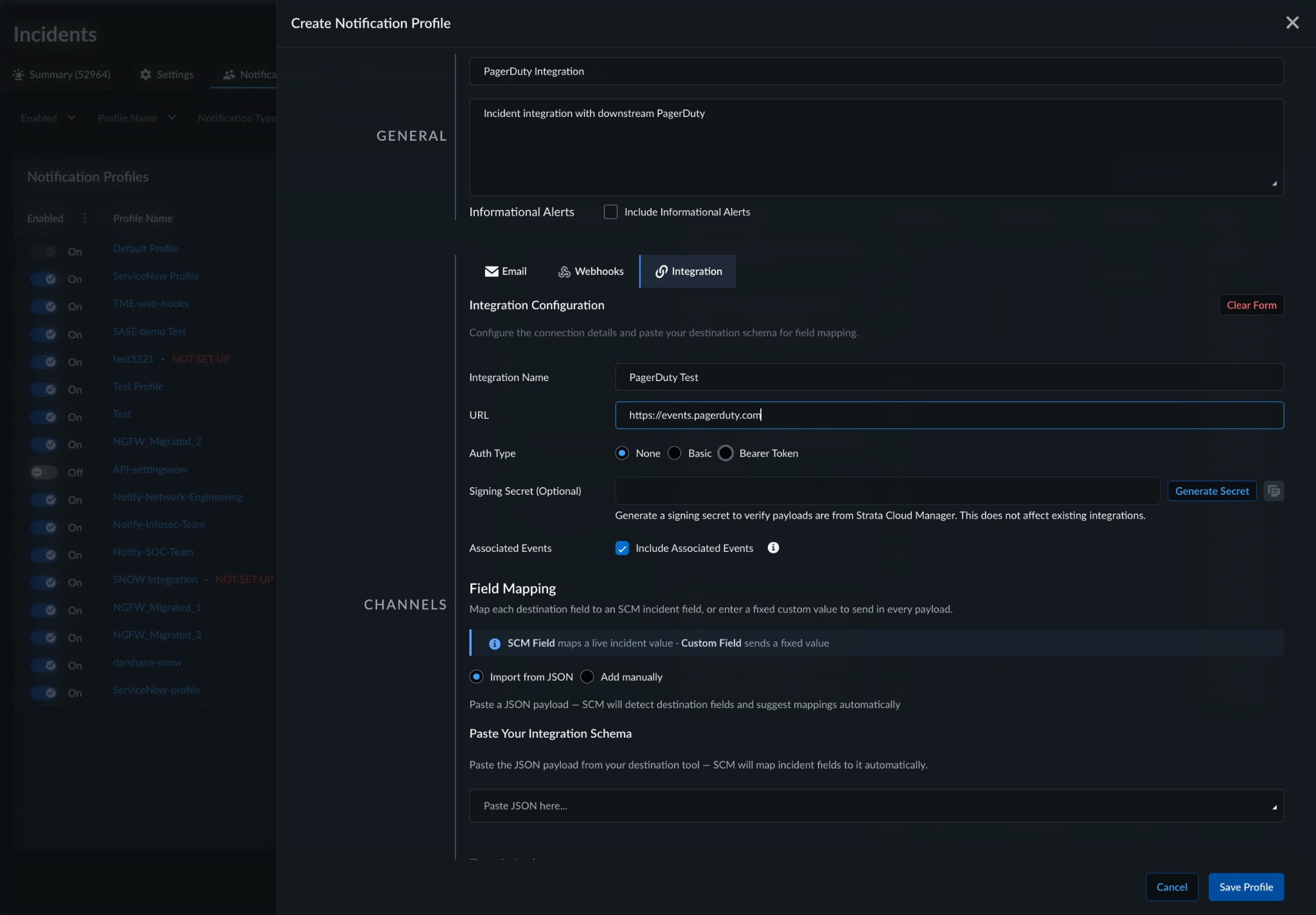
For other destinations, custom incident integrations let administrators tailor outbound payloads within SCM. They can map incident attributes to destination fields, supply static values and preview and test the payload before activation. For supported workflows, this removes the need for a separate service solely to translate the data.
Consider a team using PagerDuty for on-call response. A prolonged tunnel outage detected in SCM can trigger an event containing the incident title, identifier and details link. PagerDuty then notifies responders through its configured escalation policies. When the SCM incident clears, a status update can resolve the matching alert through a configured PagerDuty event orchestration rule.
Incident APIs also let teams retrieve incident information for custom applications and workflows.
The result is a clearer handoff from detection to response, with incident context available where teams already work.
Learn more: Incident Integrations and PagerDuty Configuration Example | ServiceNow Integration
5. Organize incidents around how your teams operate, not just the products they manage
As organizations grow, another challenge emerges: operational responsibilities don't always align neatly with individual products.
A team responsible for remote connectivity, for instance, may need to monitor multiple types of incidents across different parts of the infrastructure.
Historically, managing incidents product by product could mean creating and maintaining multiple settings for related operational functions.
SCM's Incident Domains introduce another way to organize and manage incidents.
Instead of looking exclusively through a product lens, incident domains group related incident types into functional areas, such as GlobalProtect, Remote Networks, and Mobile Users.
This makes it easier for teams to focus on the operational services they support.
For example, a team responsible for GlobalProtect connectivity can use the relevant domain to understand associated incidents without having to search through unrelated incident types.
Customers can also create domain-scoped incident settings, allowing a common raise, suppress, or notification rule to apply across the incident codes within a domain.
And when a particular product or resource requires different handling, more specific product-level or object-level settings take precedence.
This provides a useful balance between consistency and flexibility.
As networks become more distributed, incident management should increasingly reflect operational responsibilities rather than just product boundaries.
Learn more: Incident Domains
Getting started: Put unified incident management to work
Start with one operational priority, such as persistent tunnel outages. Review the relevant incidents, tune supported detection conditions, assign notification recipients and connect the incidents to your response workflow. Test delivery and lifecycle behavior, then expand to other use cases.
With the Unified Incident Framework in Strata Cloud Manager, teams can build a more consistent process for recognizing meaningful issues and getting them to the right owners. A shared view, tailored detection and connected workflows help turn operational signals into a clear path to action.
Explore the Strata Cloud Manager Incidents documentation to learn more and get started.