It's only a matter of time before your board asks: "Has our security posture actually improved since last quarter?"
You can report how many accounts you've vaulted and how many reviews you've finished, but none of that truly answers the question. AI is extraordinarily persistent, capable of waiting patiently until an opportunity presents itself, and then moving from initial foothold to cloud keys in a matter of hours. So your security exposure closely relates to time: How long does any elevated access stay open? Clearly, the shorter, the better and safer.
My favorite way to explain it is an analogy that comes with a number attached: the Trust Window.
Key Takeaway: The Trust Window is how long a privilege stays usable. The Mean Trust Window (MTW) is a proposed metric: the average number of hours per day a defined privilege remains usable across the identities on one critical access path. Track it alongside the number of identities with standing privilege to show progress toward zero standing privileges, with access opened just in time (JIT) and closed quickly after the task ends.
Fair warning: I'm a sucker for a good analogy. I’ve spent decades working in technology, and analogies have helped me grok concepts that would otherwise have taken ages to sink in. In front of customers, a good analogy really is worth a thousand words. Or five dense slides.
A few of my favorites (as a warm-up):
- A firewall is a bouncer with a clipboard. If you’re not on the list, you don’t get in. If you’re acting shifty, you don’t get in either, no matter how nice your shoes are.
- Bandwidth is how many lanes the highway has. Latency is how far away Grandma lives. A 12-lane highway doesn’t move Grandma any closer.
- Technical debt is a sink full of dirty dishes. Skipping one is fine, right up until the day you’re eating cereal with a spatula.
- Zero trust is an office where every door checks your badge. Including the supply closet…and the bathroom.
What Is a Trust Window?
My new favorite analogy describes the Trust Window. Picture a sliding glass window at a service counter, like the DMV but without the three-hour wait. Someone walks up and taps on the glass. You don’t open it at all until you recognize who’s on the other side. When you do open it, you open it only as far as needed, for only as long as needed, to get the business done. Then you slam it shut.
In identity terms, the Trust Window is how long a privilege stays usable — my colleague James Creamer called it "how long a granted privilege stays alive" in his 90-day plan. Every minute it's open, a compromised credential or a hijacked AI agent can climb through.
Three Dials: How Far, How Long, How Many
OK, in reference to the Trust Window, “slam it shut” might be a little dramatic. But everybody gets the idea right away, and it’s a great on-ramp to a conversation about identity security. It also hands you three dials to play with:
- How far it opens: what the visitor is allowed to do once the window is open.
- How long it stays open: a few minutes, a day, or (yikes) forever.
- How many windows there are: every person, service account, and AI agent with access is one more window in the building.
Check the Visitor, Watch the Window, Shut It Fast
Sometimes I work the analogy a little harder and bring in multi-factor authentication. Does the attendant recognize the face tapping on the glass? Do they ask for a driver’s license? Demand a fingerprint scan? Text a code to the visitor’s phone and make them read it back? And these days, the face at the glass might not be a face at all. It could be a service account, a script or an AI agent, and those need checking just as much as the humans do.
Then there’s the question of how far to open the window. Does the attendant check a list of what this visitor is allowed to do? Open it too little, and nobody gets any work done; they’re stuck shouting through a two-inch gap and sliding paperwork through one sheet at a time. Open it too far, and someone can reach in and grab things they shouldn’t (privilege misuse), unlatch the window next door (lateral movement), or shove their own window open even wider (privilege escalation). Bam, there’s your whole least-privilege conversation in one picture.
I’ve even worked visibility and governance into it. The attendant dutifully logs who came to the window, what they did, and how long they stayed, and a camera records the whole thing. Every so often, a manager reviews the logs and the footage, then tightens the policy, trims someone’s privileges, or revokes their access entirely. Think of it as the security version of “this call may be recorded for quality assurance.”
Close the Window When Risk Changes
There’s one storyline I haven’t tried yet because it feels a bit violent. Someone reaches through the window to do something nasty, and the attendant slams it shut on their arm, cartoon style. And yes, that’s actually a thing in identity security. It’s called Identity Threat Detection and Response, or ITDR: spotting an identity-based attack while it’s happening and cutting it off mid-reach. Happily, the real version involves no bruises, no blood, and no need for medical treatment.
Better yet, the attendant doesn't have to spot it alone. A high-confidence alert can trigger a preapproved response to revoke access or end a session, rather than wait for a ticket. That's the idea behind connecting identity controls directly to security operations.
Zero Standing Privileges: No Window Propped Open
The beauty of the Trust Window is that you can adjust it constantly. Wider or narrower. For an hour or for a day. The gold standard is opening it only at the moment someone needs it and closing it the moment they’re done. It’s really the basic definition of zero standing privileges (ZSP): By default, no window stays open at all. When someone needs access, you open it just in time, for that task, and close it the moment they're done.
Its evil twin is standing privileges. Standing privileges is the title of the book you have used to prop the trust window open around the clock, just in case.
It’s pretty obvious that you want to keep the Trust Window as small as possible. The more windows you have, the wider they open, and the longer they stay open, the more chances you give an attacker. That matters more than ever now that attackers have AI on their side. The Unit 42 investigation shows how quickly an attacker can put exposed privileges to work. Why leave the window propped open while you wait to find out?
How a Mean Trust Window Could Work
Here’s a practical proposal for Mean Trust Window: the average number of hours per day that a defined privilege remains usable across a specified group of identities. It’s a starting point you can test on one critical access path, with data you likely already have. Here’s the mini-napkin method:
- Define the privilege you’re measuring. Pick one access path important to your organization, such as production cloud administration or your vault's admin console.
- List every identity that can use it: people, service accounts, and AI agents. That's how many types of windows you can have. Don't skip the quiet ones. A standing admin account nobody touched all month is still a potential window propped open with a book.
- For each type of window, work out how many hours a day its privilege was usable, averaged over the last 30 days. A standing admin account scores 24. A just-in-time grant used for 20 minutes twice a week scores about 0.1.
- Average them. That's the Mean Trust Window for that path. Report it alongside your count of how many windows are still propped open with that dull book, Standing Privileges. For example, suppose four identities can perform similar administrative actions on one production system. These figures are illustrative:
![Table of four identities that can access one production system. A human administrator and a service account have standing access, usable 720 hours over 30 days, or 24 hours per day. A human engineer and an AI agent use just-in-time (JIT) access, usable 0.10 and 0.05 hours per day. Bars show the standing accounts filling the whole day, while the JIT bars are barely visible. A summary shows a Mean Trust Window of 12.04 hours per day and a standing privilege count of 2.]()
In this example, on one production system, two identities with standing access keep their windows open around the clock, pushing the Mean Trust Window to 12.04 hours per day.
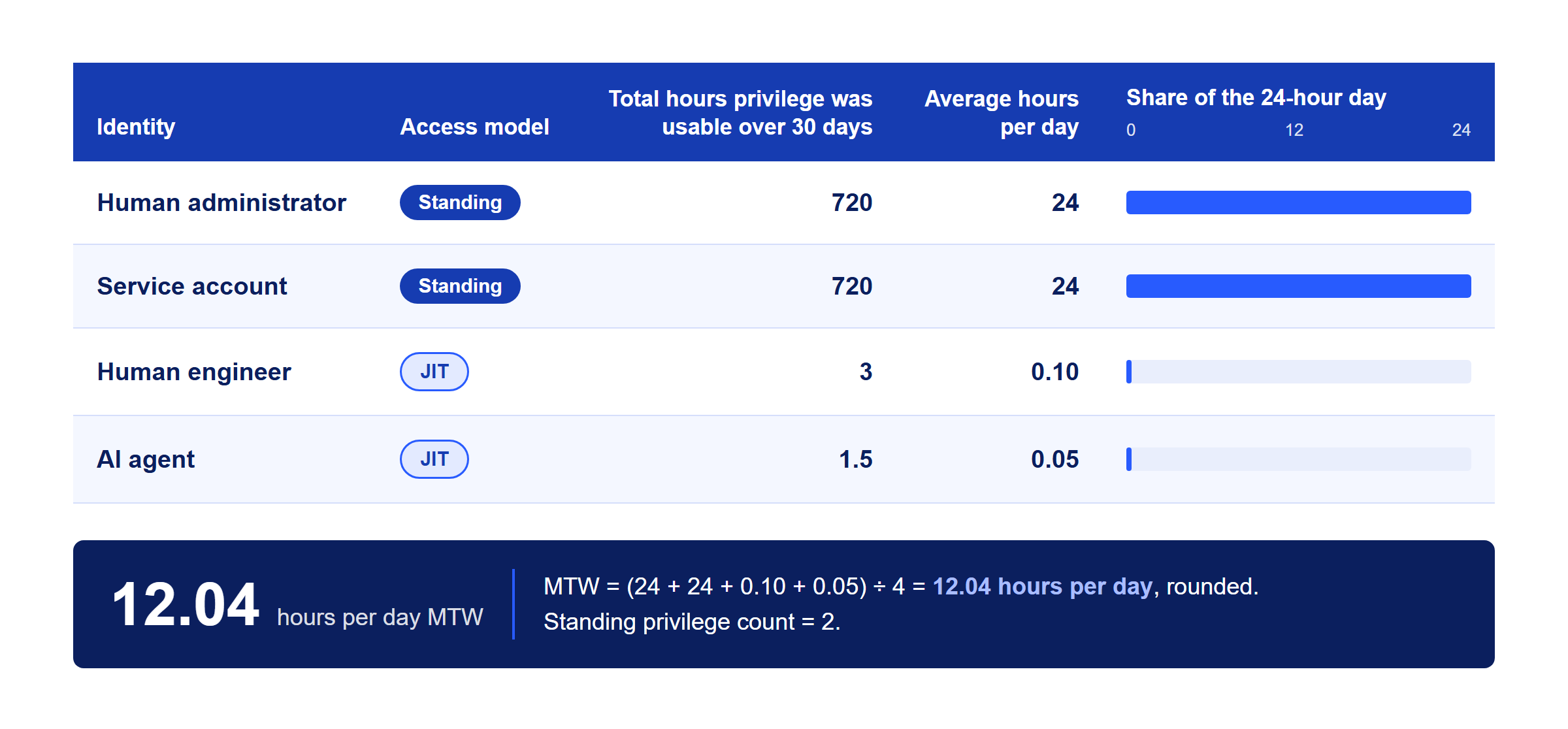
Lastly, track it monthly. Watch the propped-open windows start to disappear, and the Mean Trust Window (attacker opportunities) shrink, as you move to just-in-time.
Simplified, your goal is to calculate how many windows, how far they open, and how long they stay open. In other words, how drafty is the building? (Actually measuring how far each window opens, i.e., allowed permissions, is a harder problem for another day.) MTW measures duration, not the whole of identity risk. And keep in mind that ZSP does not dictate that MTW must reach zero: Legitimate tasks will always need temporary access.
Your goal is to calculate how many windows, how far they open, and how long they stay open. In other words, how drafty is the building?
It gives you a straightforward sentence your board will understand. Something like "On our most critical path, privilege used to be usable around the clock. Now it averages under an hour a day, and we're down from 12 standing admin accounts to zero.”
Fewer windows, opened less, shut faster. With tireless AI-driven attacks on the rise, that's a pretty good mantra.
And that’s exactly what Idira is built for. It finds every human, machine, and agentic identity holding a window and swaps out standing permissions to keep every Trust Window small. Essentially, it replaces standing permissions with JIT access and ties identity risk to automated response so the window shuts the moment something nefarious reaches through.
So crack that window, take care of business, and slam it shut. Politely, of course.
FAQs
What is a Trust Window in identity security?
A Trust Window is the period during which a privilege can actually be used. Every human, machine, and AI agent identity with access has one. Idira uses the Trust Window to describe identity risk along three dimensions: how many windows exist, how far each one opens (permissions), and how long each stays open (duration). The goal is fewer windows, opened only as far as needed and closed as soon as the work is done.
What is the Mean Trust Window (MTW)?
The Mean Trust Window is the average number of hours per day that a defined privilege remains usable across all the identities that hold it on a given access path. A standing admin account scores 24. A just-in-time grant used briefly a few times a week scores close to zero. Idira proposes MTW as a simple, board-ready metric for tracking progress toward zero standing privilege.
How do you start calculating the Mean Trust Window?
Pick one critical access path, such as production cloud administration. List every human, service account and AI agent identity that can use it. For each identity, calculate how many hours per day the privilege was usable, averaged over the last 30 days. Average those numbers. Report the result alongside the “book” count, the number of identities with standing access.
What is a good Mean Trust Window target?
There is no industry standard yet. The trend matters more than the absolute number: MTW should be squeezed month over month as standing access is replaced with just-in-time access. At some point it will plateau, ideally at a very low number. And the book count should eventually reach zero.
What is a book count?
Book count is the number of identities on an access path that hold standing privilege, meaning windows "propped open with a book." It is a companion to the Mean Trust Window, because a low average can hide a handful of always-on accounts that attackers will find and exploit.
How is the Mean Trust Window different from MTTD and MTTR?
Mean time to detect (MTTD) and mean time to respond (MTTR) measure how quickly a security team finds and stops an attack after it starts. The Mean Trust Window measures how much opportunity exists before any attack starts. They work together: Shrink MTW and there is less for attackers to use. Shorten MTTR and open windows close faster when something goes wrong.
AI-driven attacks
How does AI change identity-based attacks?
AI lets attackers automate reconnaissance, credential harvesting, and lateral movement, and run them continuously and in parallel. As the time an attacker needs shrinks, the time a privilege stays usable matters more.
Why is standing privilege more dangerous in the age of AI?
A standing privilege is available around the clock to anyone who compromises its underlying credential. A human attacker might miss the opportunity. An automated, AI-driven attacker is endlessly persistent and will not. Removing standing privilege removes the opportunity itself, instead of racing to detect its misuse after the fact.
Can AI help defenders shrink Trust Windows?
Yes. AI can analyze entitlement data to find unused and excessive privileges, recommend least-privilege policies, flag unusual identity behavior, and trigger automated responses. Palo Alto Networks applies AI across all of its security platforms.
About securing agentic AI
How do you secure AI agents that need access to business systems?
Treat AI agents as distinct identities. Give them their own credentials, scope permissions to the tasks, grant access just in time, log everything they do, and make sure access can be revoked instantly. Shared credentials and long-lived API keys create Trust Windows that don’t close as they should.
Should AI agents have their own identities?
Yes. A dedicated identity for each agent makes it possible to assign an owner, apply least privilege, audit its actions and shut it down without disrupting anything else. Agents that borrow a human's account or a shared service account are invisible to most identity controls.
What does just-in-time access look like for an AI agent?
The agent requests access for a specific task. Policy evaluates the request. A short-lived, narrowly scoped credential is issued and expires when the task completes or a time limit is reached. Every action is recorded. Ideally the whole cycle is automated and measured in seconds or minutes.
Is identity security a blocker for AI adoption?
Done well, it is the opposite. Many organizations hesitate to deploy AI agents because they cannot see or control what those agents can reach. Strong identity controls, including visibility, just-in-time access and automated revocation, are what let security teams say yes to agentic AI projects sooner.
About the Palo Alto Networks Platform
What should I do after a Unit 42 incident response engagement or assessment?
Identity, whether stolen credentials, excessive privilege, or unmanaged service accounts, shows up in a large share of attack paths. A logical next step is to inventory every identity, eliminate standing privilege on the most critical access paths, and connect identity signals to security operations. That is the work Idira is built for.
Why don't separate identity point products work as well as a unified platform?
When privileged access, identity governance, secrets, and threat detection live in separate tools, each with its own data and console, gaps open between them. An attacker who moves from a human account to a service account to an AI agent may cross three tools that no one correlates. A unified platform with one data architecture sees the whole path and can respond across it.
What is a unified identity data architecture?
It is a single, shared data foundation for every identity (human, machine, and AI agent) along with its privileges, activity, and risk, accessible to both identity and security operations teams. It makes correlation, consistent policy, and automated response possible across the security stack.
How Idira Helps Palo Alto Networks Customers
I already use Cortex. Why focus on identity security next?
Cortex detects and responds to threats across endpoint, network, cloud, and security operations data. Identity is often the path attackers use to enter and move between those domains. With Idira connected, a Cortex detection can do more than raise an alert: It can close the Trust Window an attacker is reaching through. Identity data also enriches investigations, so analysts can see which privileges a compromised account or agent actually held.
I already use Strata. How does identity security fit?
Strata controls who connects and where traffic goes. Idira controls what each person, service, and AI agent can do once connected, and for how long. Network policy and identity policy working together leave far fewer gaps than either alone.
What should I do after a Unit 42 engagement?
If a Unit 42 engagement found stolen credentials, excessive privilege or unmanaged service accounts, identity is your next project. Idira helps turn those findings into lasting change: fewer standing privileges, shorter Trust Windows, and faster automated response.
I use Prisma AIRS to protect AI agents. What does Idira add?
Prisma AIRS helps discover, assess, and protect your AI apps, models, and agents. The next question is what those agents are allowed to touch and do. Idira governs the identities and credentials they act with, giving each agent its own identity, a named owner, and just-in-time access instead of a long-lived key.
I use Prisma Browser. Where does identity come in?
Work increasingly happens in the browser, and identity matters there as much as it does at a desktop login. Together, Prisma Browser and Idira secure the work inside the browser, including step-up authentication and just-in-time approvals for high-risk actions.